In Python or Java, text is easy: you write name = "Ann" and the language takes care of everything.
C is different. C has no string type at all. Text is stored in an ordinary array of char — with one small but very important extra character at the end.
Understanding that extra character explains most of the strange string bugs beginners run into.
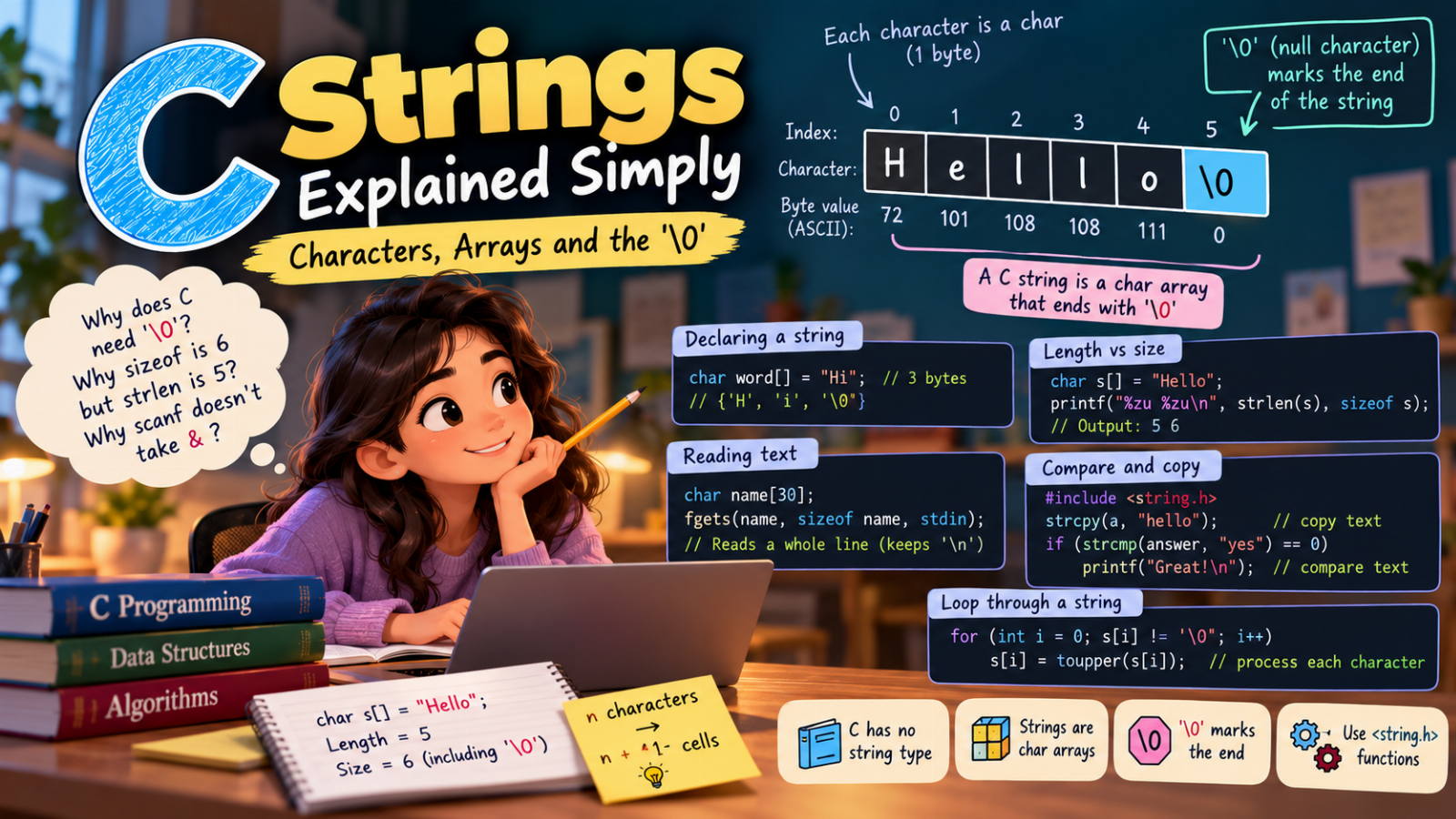
A string is a char array
Each character in C is one char, which takes one byte and holds the character's code (for example, 'A' is 65 in ASCII).
So the word Hi could be stored like this:
char word[3] = {'H', 'i', '\0'};
That third character, '\0', is the null character — the byte with value 0. It marks where the text ends.
Because typing characters one by one is tedious, C lets you write the same thing with a string literal:
char word[] = "Hi";
The compiler adds the '\0' for you, so word is 3 bytes, not 2.
| Index | 0 | 1 | 2 |
|---|---|---|---|
| Character | 'H' |
'i' |
'\0' |
| Byte value | 72 | 105 | 0 |
Why does C need the '\0'?
When you pass an array to a function, the function only receives the address of the first character. It has no idea how long the array is.
So how does printf("%s", word) know when to stop printing?
It prints character after character until it finds '\0'. The terminator is the only thing that tells it "the text ends here".
strlen works the same way: it counts characters until it reaches '\0'. You could write it yourself:
int myStrlen(const char s[])
{
    int n = 0;
    while (s[n] != '\0')
        n++;
    return n;
}
Length vs size: a classic exam question
char s[] = "Hello";
printf("%zu %zu\n", strlen(s), sizeof s);
Output:
5 6
strlen(s)is 5 — the characters before'\0'.sizeof sis 6 — every byte of the array, terminator included.
Rule: an array that holds a word of n letters needs at least n + 1 cells.
What happens without the '\0'?
char s[5] = {'H', 'e', 'l', 'l', 'o'};   // no room for '\0'
printf("%s\n", s);
This is not a string. printf prints Hello and then keeps going into whatever memory comes next, until it happens to find a zero byte. You may see Hello followed by strange symbols — or the program may crash.
The same thing happens if you write
char s[5] = "Hello"; // 5 letters, and the '\0' does not fit
Always leave room for the terminator: char s[6] = "Hello"; or simply char s[] = "Hello";.
A '\0' in the middle cuts the string
Since everything stops at the first '\0', you can shorten a string by writing one:
char s[] = "Hello";
s[2] = '\0';
printf("%s\n", s);   // He
The letters llo are still in memory, but no string function will ever look at them.
Reading text: scanf vs fgets
Suppose a user types their full name: Ada Lovelace.
char name[30];
scanf("%29s", name);
printf("[%s]\n", name);
Output:
[Ada]
%s stops at the first space. The rest (Lovelace and the Enter key) stays in the input buffer and will confuse your next scanf.
Notice two details:
- There is no
&beforename: an array name already is an address. %29slimits the input to 29 characters, leaving room for'\0'. Without a limit, a long input would overflow the array.
To read a whole line, use fgets:
char name[30];
fgets(name, sizeof name, stdin);
printf("[%s]\n", name);
Output:
[Ada Lovelace
]
fgets reads spaces too, and it never writes past the end of the array. But it keeps the newline ('\n') from the Enter key — that is why the ] moved to the next line. Remove it like this:
#include <string.h>

name[strcspn(name, "\n")] = '\0';
strcspn finds the position of the first '\n', and we replace it with the terminator.
Never use
gets(). It has no size limit at all, which made it so dangerous that it was removed from the C language.
You cannot assign or compare strings with = and ==
These two lines look reasonable but are wrong:
char a[20];
a = "hello";                 // error: arrays cannot be assigned

if (answer == "yes") { }     // compares two ADDRESSES, never the text
Use the functions from <string.h> instead:
strcpy(a, "hello");               // copy text into the array

if (strcmp(answer, "yes") == 0)   // 0 means "equal"
{
    printf("Great!\n");
}
Just remember that strcpy and strcat do not check the size of the destination. Make sure the array is big enough, or the copy will overwrite other memory (a buffer overflow).
Walking through a string
You do not need the length to loop over a string — just stop at '\0':
#include <stdio.h>
#include <ctype.h>

int main(void)
{
    char s[] = "c lab 2026";

    for (int i = 0; s[i] != '\0'; i++)
        s[i] = toupper(s[i]);

    printf("%s\n", s);   // C LAB 2026
    return 0;
}
toupper changes lowercase letters and leaves everything else as it is.
See it in memory
In our free interactive lab you can watch printf hunt for the '\0' one character at a time, see the garbage that appears without a terminator, and compare scanf and fgets reading the same name — including what is left behind in the input buffer:
- Strings in C
- String and character functions —
strcat,strcmp,toupper
Quick summary
- A C string is a
chararray that ends with'\0'. - The array needs one more cell than the number of characters.
printf("%s"),strlenand all string functions stop at the first'\0'.scanf("%s")reads one word;fgetsreads a whole line (and keeps the'\n').- Copy with
strcpy, compare withstrcmp— never with=or==.
Practice
- Write a loop that counts the vowels in a string.
- Reverse a string in place by swapping characters from both ends.
- Read a full name with
fgets, remove the newline, and print it in capital letters. - Check whether a word is a palindrome (
level,madam).
Once you think of strings as "characters followed by a zero", they stop being mysterious.