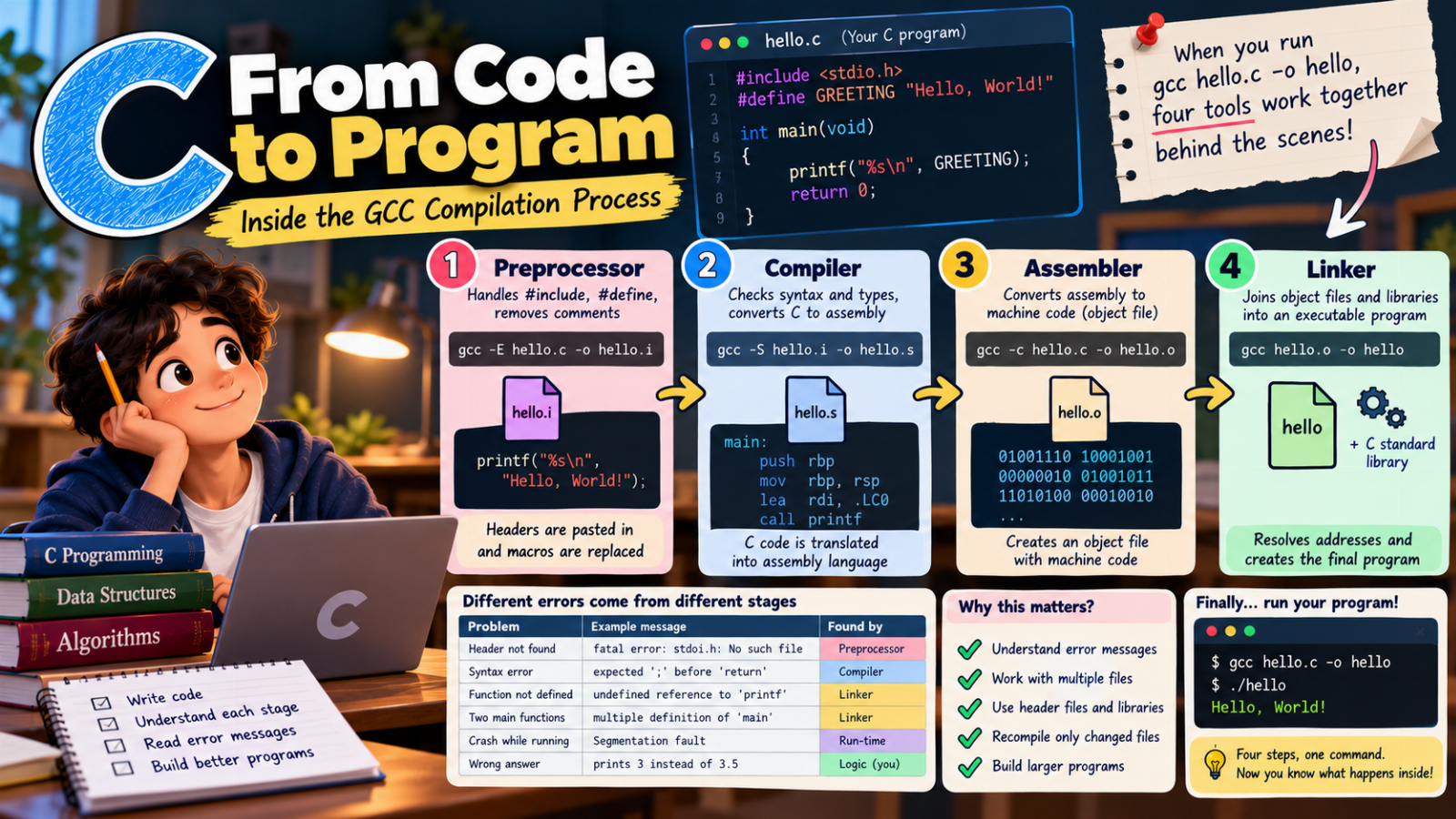
You write a C program, type gcc hello.c -o hello, and a moment later you can run ./hello.
It feels like one step. In reality, gcc runs four separate tools one after another. Knowing what each of them does helps you understand error messages, answer a very common exam question, and later work with programs made of many files.
Let's follow this small program on its journey:
// hello.c
#include <stdio.h>
#define GREETING "Hello, World!"

int main(void)
{
    printf("%s\n", GREETING);   // say hello
    return 0;
}
The big picture
hello.c  →  preprocessor  →  hello.i  (C code, headers pasted in)
         →  compiler      →  hello.s  (assembly language)
         →  assembler     →  hello.o  (machine code, not runnable yet)
         →  linker        →  hello    (the program you can run)
You can stop gcc after each stage and look at the result yourself.
Stage 1: The preprocessor
The preprocessor does not understand C. It is a text processor that handles every line starting with # and a few other jobs:
#include <stdio.h>→ the wholestdio.hfile is copied into your file.#define GREETING "Hello, World!"→ everyGREETINGis replaced by the text"Hello, World!".- Comments are removed.
#ifdef … #endifblocks are kept or thrown away.
See its output:
gcc -E hello.c -o hello.i
Open hello.i. Your six lines of code are at the very bottom — after hundreds of lines copied from stdio.h, including the declaration of printf. The line with printf now reads:
printf("%s\n", "Hello, World!");
GREETING is gone, and so is the comment. The compiler never sees them.
This is why a missing
#include <stdio.h>causes trouble later: without it, the compiler does not know whatprintfis.
Stage 2: The compiler
The compiler is the part that really understands C. It:
- checks the syntax (missing semicolons, unmatched brackets)
- checks types (are you passing the right kind of values?)
- translates your C code into assembly language for your processor
- optimises it if you ask (
-O2)
gcc -S hello.i -o hello.s
hello.s is a text file with instructions such as mov, lea and call printf. Different processors (Intel/AMD, ARM in phones) have different assembly languages — that is why the same C code can be compiled for many machines.
Most of the error messages you see as a beginner come from this stage:
hello.c:7:5: error: expected ';' before 'return'
The numbers are the line and column. Always read the first error first — later errors are often caused by the first one.
Stage 3: The assembler
The assembler turns the assembly text into machine code — the binary instructions the processor actually executes.
gcc -c hello.c -o hello.o
-c means "compile and assemble, but do not link". The result, hello.o, is an object file.
You cannot run it yet. It contains the machine code of main, but where the code calls printf there is only a note: "call printf — address unknown". The real printf is not inside your file. It lives in the C standard library.
Stage 4: The linker
The linker puts the pieces together:
- your object file(s)
- the needed parts of the C standard library (where
printfreally is) - a small piece of start-up code that prepares everything and then calls your
main
It fills in every "address unknown" note and writes the final executable:
gcc hello.o -o hello
./hello
Hello, World!
On Windows the file is called hello.exe and you run it with hello.
Errors from different stages look different
This is where the four stages become really useful. Make a typo in a function name:
prinft("%s\n", GREETING);
With an older compiler you get two messages from two different stages:
warning: implicit declaration of function 'prinft'
undefined reference to `prinft'
- The warning comes from the compiler: it has never heard of
prinft, but it guesses and carries on. - The error comes from the linker: it searched every object file and library and could not find a function called
prinft.
Newer compilers (GCC 14 and later) no longer guess: the first message is already an error, and the program stops at the compiler stage. You will still meet the linker's "undefined reference" whenever a function is declared (for example in a header) but its code was never written or its file was not compiled in.
Here is a table worth remembering:
| Problem | Example | Found by |
|---|---|---|
| Header not found | fatal error: stdoi.h: No such file |
Preprocessor |
| Syntax error | expected ';' before 'return' |
Compiler |
| Function never defined | undefined reference to 'prinft' |
Linker |
Two definitions of main |
multiple definition of 'main' |
Linker |
| Crash while running | Segmentation fault |
Running the program (run-time error) |
| Wrong answer | prints 3 instead of 3.5 | Nobody but you (logic error) |
Why the stages matter for bigger programs
Real programs are split into many files:
gcc -c main.c      # → main.o
gcc -c maths.c     # → maths.o
gcc main.o maths.o -o calculator
If you change only maths.c, you only need to recompile that file and link again. In a project with hundreds of files this saves a lot of time — and it is exactly what build tools like make do for you.
This is also why we write header files (maths.h) with function prototypes: main.c needs to know what add() looks like while compiling, even though its code is in another file. The linker connects the call to the code later.
Watch your code go through the steps
In our free C course the very first lesson shows these stages with an animation, the setup lesson explains every gcc command and error message, and the preprocessor lesson lets you watch #define replace text before compiling:
- Introduction to C — from code to program
- Setting up: write, compile and run — gcc commands, errors vs warnings
- Preprocessor and command-line arguments — macros and
#ifdef
Quick summary
- Preprocessor: pastes headers, replaces macros, removes comments →
gcc -E - Compiler: checks your C and turns it into assembly →
gcc -S - Assembler: turns assembly into machine code (an object file) →
gcc -c - Linker: joins object files and libraries into a runnable program →
gcc file.o -o program - "undefined reference" is a linker error; "expected ';'" is a compiler error.
Try it yourself
- Run
gcc -Eon a program with a#defineand find the replaced text in the output. - Run
gcc -Sand look at the assembly for a small loop. - Misspell
printfon purpose and read both messages. - Split a program into
main.candmaths.cwith a headermaths.h, compile both with-cand link them.
Once you know what happens behind gcc, error messages stop being scary — they tell you exactly which stage is unhappy.